Made in chat.
At home online.
Turn what you make with Claude, ChatGPT and other AI clients into public websites. Publish to your own Cloudflare account, then keep creating.

From done
to published.
You made something worth sharing. Ask Publisher to put the finished files online, and get a public address back in the conversation.
A personal page, a project showcase, an event announcement, a wonderfully specific little calculator. Give it a home beyond the chat.
Watch the everyday workflow, from a creation in ChatGPT to a website you can share. It works the same way in Claude.
Your Publisher. Your Cloudflare.
The installer sets up Publisher in your account. After that, your AI client sends selected website files to your Publisher, which publishes them to Cloudflare's edge. Everyday publishing and visitor traffic run through your infrastructure.
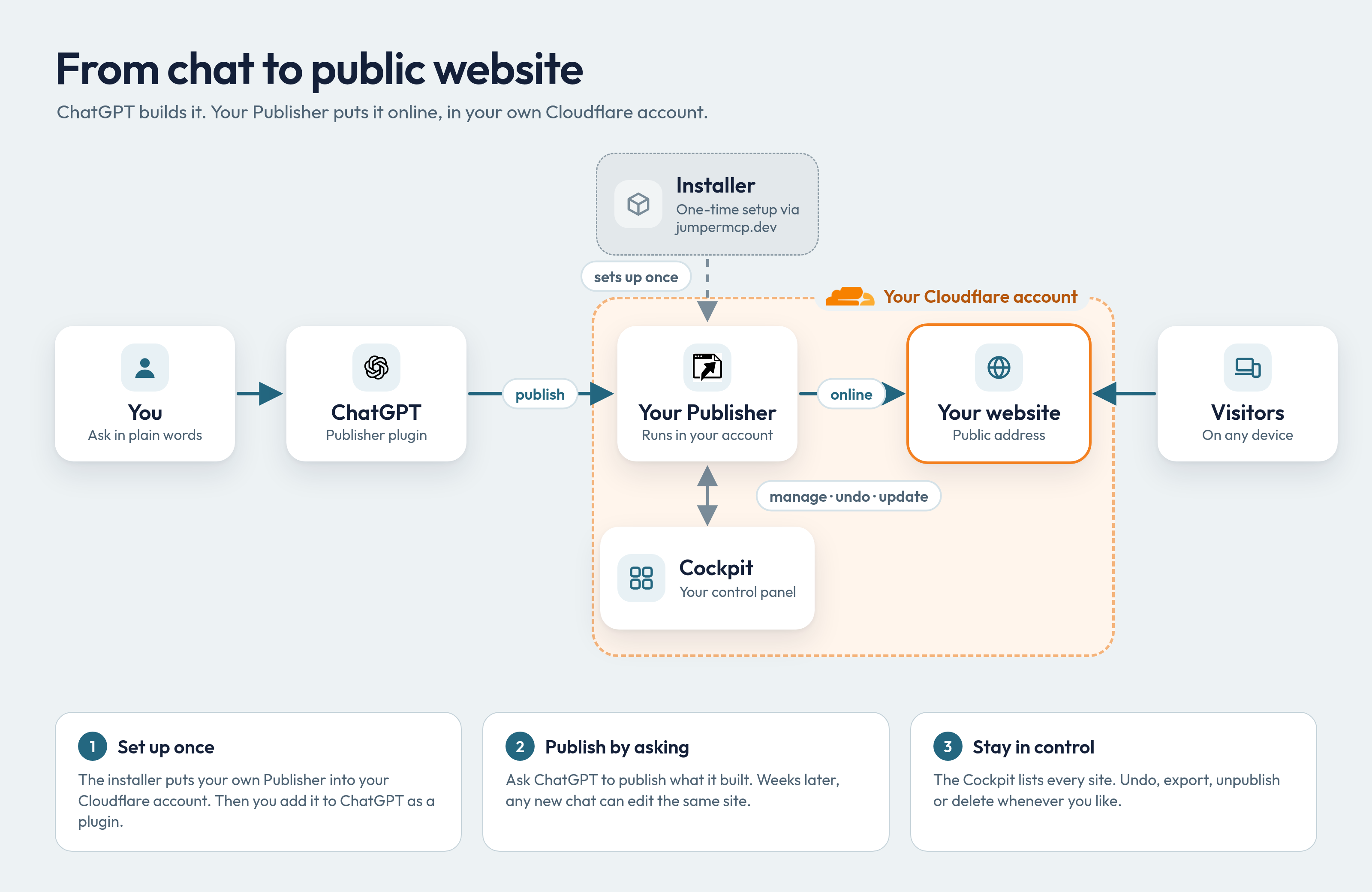
A direct path to the edge. Routine website files do not pass through Jumper MCP's installer. Existing sites keep working independently of it.
A control panel of your own. Your Publisher cockpit lists your projects and lets you manage, export, unpublish, or delete them.
A new chat.
The same site.
The conversation can end. Your project carries on. Find a site by its name, project ID, or saved public address and pick up where you left off, even in a different AI client: start in ChatGPT, keep going in Claude.
Read the story behind Publisher ↗- Edit
- Change the headline, add a picture, or update a date from a later conversation. Your published address stays the same.
- Undo
- Republish the previous snapshot when you want to go back. Publisher keeps a history of successful publications.
- Export
- Download your website files whenever you need them. Unpublish a site without deleting the project behind it.
One setup. Then it's part of the conversation.
Bring a Cloudflare account and an AI client that can add a custom MCP connector, such as Claude or ChatGPT. The guided installer gets your own Publisher in place. Read the documentation.
Connect your Cloudflare
Start Publisher install, authorize installation, and choose the account where your Publisher will live.
Make Publisher yours
Create your owner password and follow the setup instructions to connect website publishing.
Add it to your AI client
Paste your Publisher's MCP address into Claude or ChatGPT as a connector. Sign in, then bring your first creation.
Before you publish.
A few things to know about the workflow.
What can I publish?
Static websites: HTML, CSS, JavaScript, and images, including prebuilt output from frontend frameworks. Bring ready-to-publish files or a ZIP containing an index.html. Publisher does not run builds, install packages, or host application backends and databases.
Does it publish my whole conversation?
No. Publish the website files you select and review. Those files become public; your conversation is not the website. Check what you are sharing before asking Publisher to publish it.
Is it really zero clicks?
That is the idea behind the everyday workflow: ask to publish and receive a URL in the chat. Installation is a one-time guided process, and your AI client may still ask you to confirm an action.
Do I need a repository or an API key?
You do not need GitHub, a terminal, or an API key from your AI provider for everyday publishing. Setup may require a scoped Cloudflare API token, which you enter directly into your own Publisher. Follow the installer for the current steps.
Will it work with my accounts?
Check that your AI client lets you add a custom MCP connector (Claude and ChatGPT both do) and that you can create Workers in your Cloudflare account. Account access and Cloudflare quotas apply; the installer explains the requirements.
Give your next idea a public address.
Install PublisherDocumentation · Privacy policy · Source code @ GitHub
Agentic Infrastructure Provisioning by Jumper MCP.
Publishing with Publisher. SaaS workflows with WebMCPx.